Build a Solana Portfolio Tracker with Google Apps Script and Replit

Introduction
If you track multiple speculative Solana tokens—memecoins, early-stage projects, narrative plays—you've felt this pain:
CoinMarketCap and Co. are great for browsing, not so great for monitoring. You're stuck refreshing tabs manually.
SaaS portfolio trackers cost money, and most don't cover low-cap Solana tokens.
Spreadsheets are flexible but dumb. A basic Google Sheet can't alert you when a token crosses the $1M market cap at 2 AM.
Writing a backend is overkill. A price alert shouldn't require a server, database, scheduler, and deployment pipeline.
The result: most DIY crypto investors either overpay for tools they barely use or miss opportunities because they're not glued to a screen.
I built a solution with Replit and Google Apps Script. Everything runs inside Google Sheets.
What I Built
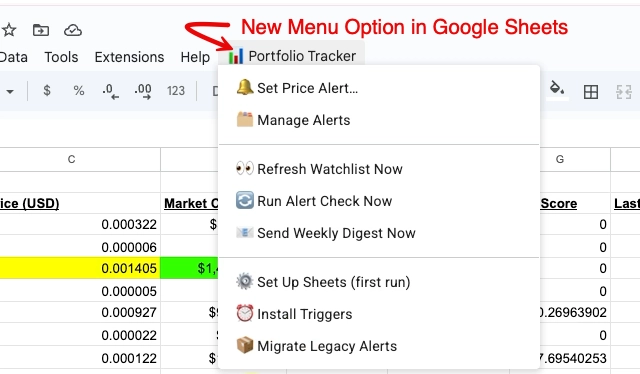
The Jupiter Crypto Portfolio Tracker is a Google Sheets add-on built with Google Apps Script for automation that:
Fetches live metrics for any Solana token—price, market cap, liquidity, holder count, and Jupiter's "organic score"—directly from the Jupiter API
Tracks multiple portfolios simultaneously: a main portfolio, a GTA6 thematic basket, and a Watchlist
Logs a daily snapshot of every token to a history tab, building a time series you can chart or analyze
Sends hourly or daily alerts that check price targets and percentage moves, then emails you when conditions are met
Creates recurring ±10% price alerts automatically for any token added to the Watchlist tab
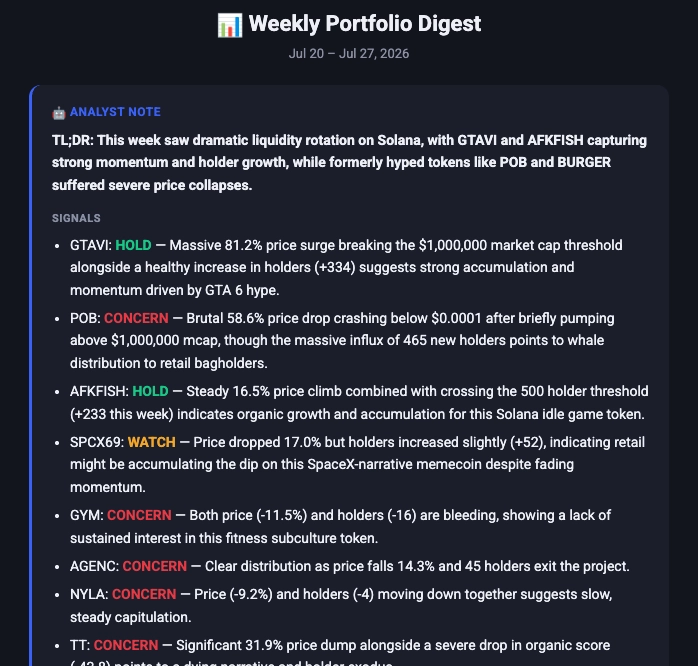
Sends a weekly digest every Friday evening: a performance table, top gainers and losers, holder milestones, and an AI-written summary from Gemini
Delivers a dark-themed, CoinMarketCap-style UI inside Google Sheets, with modal dialogs for setting alerts and a sidebar for managing them—no separate app needed
Zero cost. Lives entirely in tools you already have.
The Stack
Layer | Technology | Role |
Data source | Real-time Solana token metrics | |
Compute | Google Apps Script (V8 runtime) | All logic, scheduling, email |
Storage | Google Sheets tabs | Portfolios, history, alerts, settings |
UI | HTML Service (GAS) | In-sheet modal dialogs + sidebar |
MailApp (GAS built-in) | Alert emails + weekly digest | |
AI narrative | Gemini API | Weekly digest analyst commentary |
Dev environment | Editor, version control, AI pair programming | |
Deployment bridge | clasp (Google's CLI) | Sync code from Replit → Google Apps Script |
Secrets | PropertiesService (GAS) | Secure API key storage (never in code) |
The Replit + Google Apps Script Workflow
This is what makes the project worth studying for Replit developers and Google Sheets power users alike.
The problem with the default GAS (=Google Apps Script) editor: Google's built-in Apps Script editor is functional but primitive. No Git, no real autocomplete, no multi-file workflow, no AI assistance, no proper terminal. For anything beyond a toy script, it becomes painful fast.
The solution: use Replit as your development environment and push code to GAS via clasp.
Step 1 — Project Setup in Replit
Create the project in Replit and install clasp as a dev dependency:
npm install --save-dev @google/claspThe package.json defines two scripts:
"scripts": {
 "push": "bash scripts/push.sh",
 "pull": "bash scripts/pull.sh"
}
npm run push deploys local code to the live Google Apps Script project. npm run pull syncs changes made in the GAS editor back to Replit.
Step 2 — Authentication with CLASPRC
clasp authenticates via a credential file (.clasprc.json). Rather than committing it to the repo, store it as a Replit Secret (CLASPRC_JSON). The push script writes the secret to disk at runtime, executes the push, then deletes it—keeping credentials out of the codebase entirely.
Step 3 — Code, Iterate, Push
The development loop:
Edit code.js, AlertDialog.html, or ManageAlerts.html in Replit's editor with AI pair programming available
Run npm run push in the Replit shell
Open the Google Sheet, reload, and test via the custom menu
Repeat.
Replit as a Google Apps Script IDE is an underexplored workflow almost no one has documented.
Step 4 — Trigger Installation
Once the code is live in GAS, running ⚙️ Set Up Sheets (first run) from the custom menu creates all necessary tabs. Then ⏰ Install Triggers wires up three automated jobs:
Daily at 1 PM — snapshots every portfolio and runs alert checks
Every hour — evaluates all active alerts without logging history
Weekly (configurable day/hour) — sends the Gemini-powered digest email
These triggers run on Google's infrastructure indefinitely, at no cost, with no server.
Feature Deep-Dive
Jupiter API Integration
Every token is identified by its Solana mint address. The script calls Jupiter's search endpoint:
https://lite-api.jup.ag/tokens/v2/search?query=<mint_address>
This returns price, market cap, liquidity, holder count, and organic score in a single call. A 2-attempt retry with 2-second backoff handles transient API errors—if a token isn't found, it logs an error rather than crashing the run.
Multi-Portfolio Architecture
Three portfolio types ship out of the box, each as a named Google Sheet tab:
Main portfolio — primary holdings with a full History Log
GTA6 Tracker — a separate thematic basket with its own history
Watchlist — metrics-only monitoring (no history log) with auto-alert generation
Adding a portfolio requires one object in the PORTFOLIOS array. The generic logPortfolioHistory_() function handles all of them without duplication.
The Data-Driven Alert Engine
This was the most significant engineering decision in the project.
The original design used hardcoded if/else blocks—fixed thresholds, specific price targets per token. Every change required editing and redeploying code.
The rebuilt engine uses a hidden "Alerts" sheet as its database. Each alert has 14 columns:
ID · Token · Mint · Metric · Condition · Target · Recurring flag · Cooldown hours · Window hours · Status · Last fired time · Baseline value · Baseline time · Created date
This means:
Create, edit, pause, resume, and delete alerts without touching code
Four condition types: above, below, pct_increase, pct_decrease
Recurring alerts re-arm automatically after a configurable cooldown
One-time alerts flip to FIRED after triggering
Concurrency is managed by LockService. If two hourly triggers overlap, only one runs the alert checks—no duplicate emails.
Single-fetch optimization: Each alert check fetches a token's metrics once from the Jupiter API, then shares those metrics across every alert for that token. API calls scale with unique tokens, not total alerts.
Rolling Baseline for Percentage Alerts
A "+10% in 24 hours" alert sounds simple but "baseline" is ambiguous when the trigger runs hourly.
The solution: each percentage alert stores a baselineValue and baselineTime in the Alerts sheet. On every check:
If no baseline exists, record the current value and skip (seeding the window)
If the baseline is older than the configured window (e.g., 24 hours), reset it to the current value
Otherwise, compute the change from the stored baseline and fire if the threshold is crossed
When a recurring percentage alert fires, the baseline resets to that point so the next +10% move measures from the new position, not the original seed.
Watchlist Auto-Alerts
Drop a token name and mint address into the Watchlist tab. On the next hourly run, syncWatchlistDefaultAlerts_() checks the tab and creates ±10% recurring price alert pairs for any token missing them. The threshold is configurable in the Settings sheet.
Gemini AI Weekly Digest
Every Friday morning (configurable), the script:
Reads 7 days of history from all portfolio log sheets
Calculates per token: price change %, market cap change %, holder count delta, organic score delta, and milestones crossed (1K, 5K, 10K, 25K, 50K, 100K holders)
Identifies the top 3 gainers and top 3 losers by 7-day price performance
Pulls fired alerts from the Alert History sheet
Assembles everything into a prompt and calls the Gemini API
Gemini writes a 2–3 paragraph analyst commentary: biggest movers, divergences (price up + holders down = possible distribution; holders up + price flat = accumulation), risks, and what to watch next week
Sends a dark-themed HTML email with a performance table, movers section, milestones, alert recap, and the AI narrative
The Gemini API key lives in GAS PropertiesService script properties—never in code or the spreadsheet.
Custom Sheets UI
Google Apps Script for Google Sheets embeds two HTML interfaces directly into the spreadsheet:
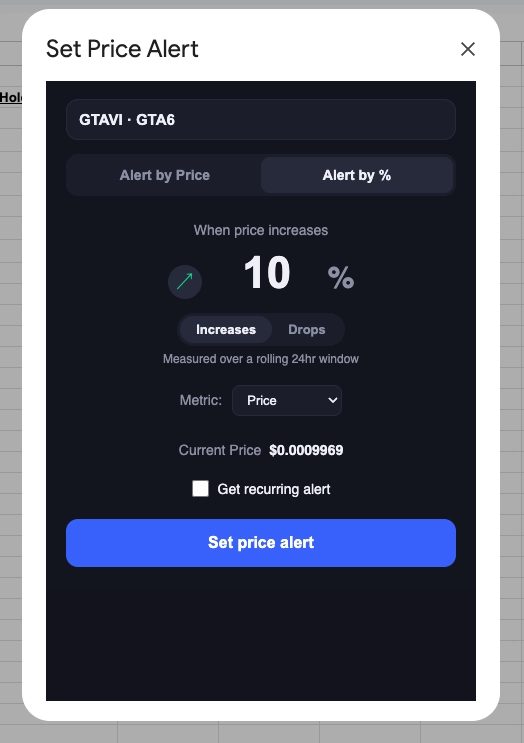
Alert Dialog (modal): A dark-themed popup with two tabs—"Alert by Price" (absolute target) and "Alert by %" (percentage move with direction toggle). It displays the token's current live value, infers whether the alert is above or below that value, and submits directly to the Apps Script backend.
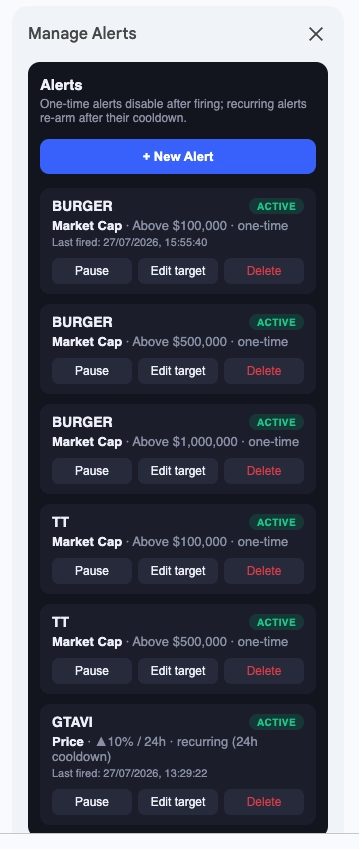
Manage Alerts (sidebar): A panel listing all alerts with status badges (ACTIVE, PAUSED, FIRED), a condition summary, last fired time, and action buttons: pause, resume, edit target, and delete. Editing opens an inline input without navigating away.
Problems Solved Along the Way
Problem | Solution |
GAS editor has no version control or AI assistance | |
clasp credentials can't live in the repo | Stored as Replit Secret, written to disk at push time, then deleted |
Hardcoded alert logic required code changes for every new alert | Rebuilt as a data-driven engine using a hidden Alerts sheet |
Percentage alerts needed a meaningful "window" baseline | Rolling baselineValue + baselineTime with per-alert window expiry |
Overlapping hourly triggers could fire duplicate emails | LockService.getScriptLock() with 30-second timeout |
API calls multiplying with alert count | Single-fetch-per-token cache within each check run |
Old hardcoded alerts needed migration to the new engine | migrateLegacyAlerts() one-time migration function in the menu |
Gemini API key needed to stay secure | GAS PropertiesService script properties |
Adding a new portfolio duplicated function logic | Generic logPortfolioHistory_() + PORTFOLIOS config array |
What This Shows About Replit
This project makes a strong case for Replit as a professional development environment, not just a learning platform:
Replit as a clasp/GAS IDE: File management, a real terminal, npm, and AI pair programming for a platform that has almost no native tooling. This workflow is underexplored and undervalued.
Replit Secrets for credential management: The CLASPRC_JSON secret keeps Google OAuth credentials out of the codebase. The same pattern applies to any sensitive config.
Replit AI accelerated the hardest parts: The alert engine refactor, rolling baseline logic, and LockService concurrency pattern. These non-obvious design choices would otherwise cost hours on Stack Overflow.
Zero infrastructure footprint: The app runs entirely on Google's infrastructure (Apps Script + Gmail + Sheets). Replit is purely the development environment—no hosting, no server, no deployment target beyond npm run push. Using Google Apps Script SpreadsheetApp as the data layer means there's nothing to provision, maintain, or pay for.
Who This Is For
Solana degens and token hunters tracking 10–30 positions across thematic baskets
Developer-curious traders comfortable with spreadsheets who want automation without writing a backend
Anyone paying for a SaaS portfolio tracker who wants a free, self-owned alternative they fully control
Makers and indie developers who want a real-world example of Replit + Google Apps Script as a production workflow